Comps
Open the same search in several cities at once, jot down what similar listings are asking, and let A9 Lister work out the going rate before you set your price.
What comps are#
"Comps" are comparable listings: places or items like yours that are on the market now. Before you set a rent or a price, look at what they ask. The Search & comps tab has two cards. The left one helps you find them. The right one keeps what you find and does the arithmetic.
Search several cities at once#
- Open the Search & comps tab.
- Under Looking at, pick what you are comparing: Apartments and houses for rent, Real estate for sale, Cars and trucks, Furniture, Tools or Everything for sale.
- Add Keywords, a Min price and Max price. For rentals and real estate there is also Min bedrooms.
- Under Cities, tick the cities to search. To add one, type its short name, such as
eugene, in the box and click Add. - Under Only show, tick Has photos or Posted today if you want to narrow the results.
- Click Open ↗ beside a city. Its search opens in a new tab with your settings filled in.
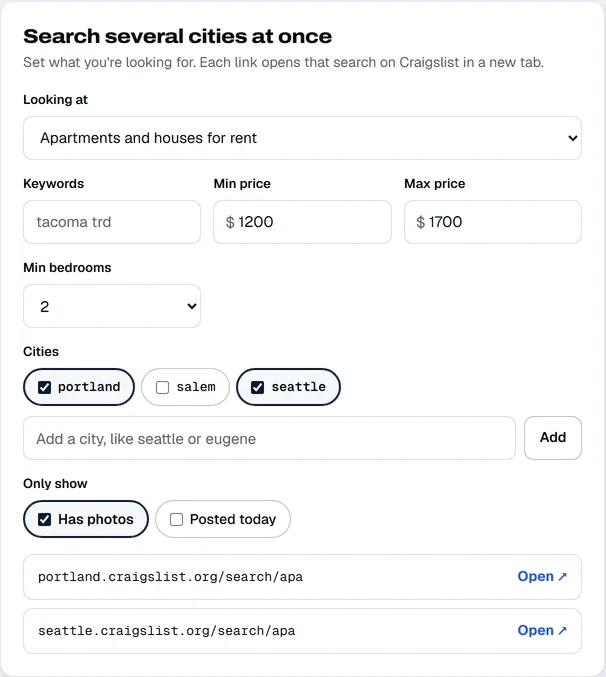
Your settings are remembered, so the next time you come back you only change what is different.
Keep the comps you find#
- In the Comps you've found card, type a short description under What it is, such as "2 bed in Beaverton, top floor".
- Enter the Asking price. For housing, add Sq ft too.
- Click Add comp. It joins the table below.
- To remove one, click the × at the end of its row.
The going rate#
As you add comps, the three boxes at the top of the card fill in:
- Average ask is the average of every asking price you entered.
- Range is the lowest and highest.
- Per sq ft is the average price per square foot, worked out from the comps that have both a price and square feet. If none do, the box shows how many comps you have.
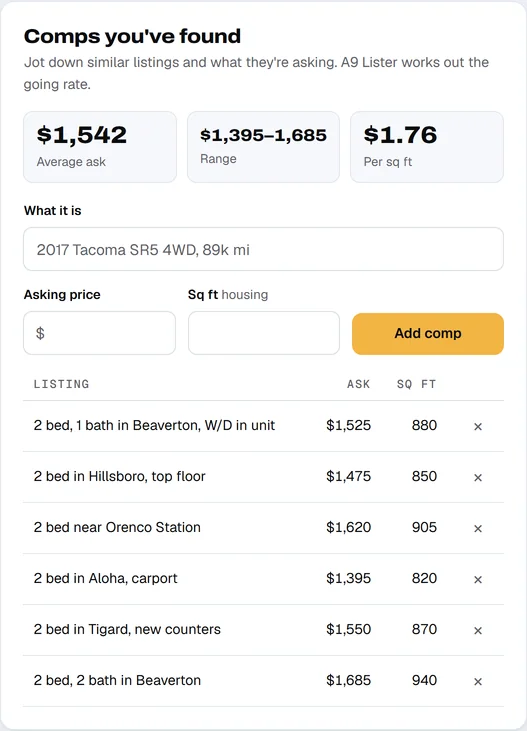
Use the average and the per-square-foot figure as a check on your own number. They are a starting point, not a valuation: asking prices are not what places rent or sell for.