Writing an ad
Choose what you are listing, answer the questions, pick a title and copy the finished ad. The preview updates as you type.
Pick what you are listing#
Each category asks the questions that matter for that kind of ad, and writes the ad to fit.

| Category | It writes | Checked for |
|---|---|---|
| Apartment for rent | Titles, the ad and the posting-form answers for a unit. | Fair-housing check |
| House for rent | The same, for a house, duplex, townhouse or condo. | Fair-housing check |
| House for sale | The ad for a home you are selling by owner. | Fair-housing check |
| Car or truck | Make, model, year, miles and title status. | |
| Furniture | Condition, size and pickup. | |
| Anything else | Any other item for sale. | |
| Services offered | What you do, where, and how to book. | |
| Job opening | The role, pay and how to apply. | Hiring-language check |
The checks are explained in The wording check. Changing the category starts a fresh form; your Profile details carry over.
Fill in the form#
- Answer the questions that show first. They are the ones the ad cannot do without, such as Rent per month, Bedrooms and Sq ft for an apartment.
- Write Highlights as a short list separated by commas, such as "top floor, vaulted ceilings, new counters". Highlights feed both the titles and the bullet list in the ad.
- Open More details for the optional questions, such as Move-in special, Deposit, Application fee and What's nearby. Anything you fill in there goes into the ad.
- Read the Tips at the bottom of the preview. They point out what makes an ad get skipped, like a missing price.
Nothing is posted and nothing is saved until you choose to. The preview is only a preview.
Pick a title#
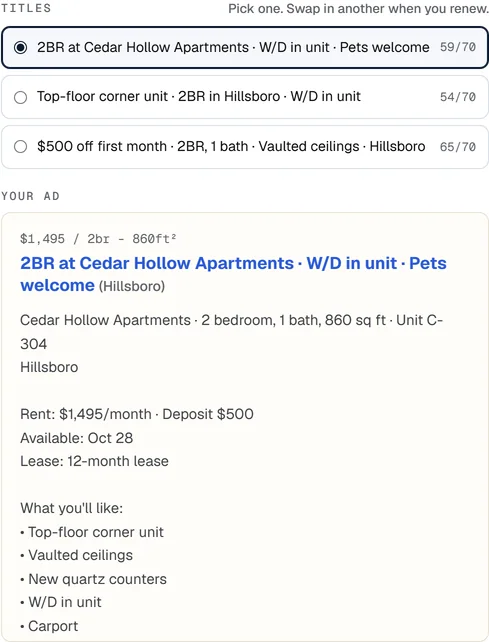
A9 Lister writes three titles from your details, each kept to 70 characters. A counter such as 38/70 shows the length. Click the one you want.
The three are different on purpose. Use another one when you renew, so the ad does not look identical to the one it replaces.
Copy the ad#
Under the ad, choose how you want it copied, then use the buttons.
- Plain text copies the ad as ordinary text. Use it for Facebook Marketplace, OfferUp and any other site that shows plain text.
- Formatted (HTML) copies the ad with simple formatting. Paste it into Craigslist's posting box as it is.
- Copy title, Copy ad text and Copy both put the text on your clipboard. A small message at the bottom of the screen confirms it.

Save it to My listings#
Click Save to My listings. The ad gets a reference code and appears on the My listings tab as a draft. The button changes to Save changes, and the bar above the form says "Editing AL-0001. Changes save to that listing."
- To change a saved ad later, click Edit on its row in My listings. The form opens with its details.
- To start a different ad instead, click Write a new ad instead in the bar above the form.
- To empty the form but keep the category, click Clear form.
Editing a saved ad does not change what you already posted. Copy it again and paste the new text into the posting page.
The example ad#
The first time you open the free tool, the form holds an example apartment ad, marked Example. Change any field and the mark goes away, or click Start blank. In My listings, Leads and Search & comps, the Show me an example button adds sample rows so you can see how those tabs look. Remove them any time with Remove example data on the Profile tab.