Renewals and reposting
See which ads can be renewed, which are about to drop off and which have expired. A9 Lister keeps the clock; you renew or repost on the posting site yourself.
How the clock works#
When you post an ad, you tell A9 Lister, and it starts counting from that moment. It uses the schedule most posting sites follow:
- An ad can be renewed every 48 hours. Renewing moves it back to the top of the search results.
- An ad drops off the site 30 days after it was posted. After that it has to be reposted.
Cars and job openings are different. The posting site charges for those, so they cannot be renewed for free. They go from Live to Expires in … to Expired, and you repost them.
What the labels mean#
Each row on the My listings tab has a status label and a line that says what to do.
| Label | What it means | What to do |
|---|---|---|
| Draft | Saved, not posted yet. | Post it, then click Mark posted. |
| Live | Posted, with time left before it can be renewed. The line under the title says "Can renew in 31h. Expires in 29 days." | Nothing yet. |
| Renew now | 48 hours or more since it was posted or last renewed (A9 Lister's working rule). | Renew it on the posting site, then click I renewed it. |
| Expires in 2 days | Less than 3 days left in its 30. | Renew it, or repost it if it is a paid category. |
| Expired | Dropped off the site. | Post it again, then click I reposted it. |
| Closed | Rented, sold or filled. | Click Post again if it is back on the market. |
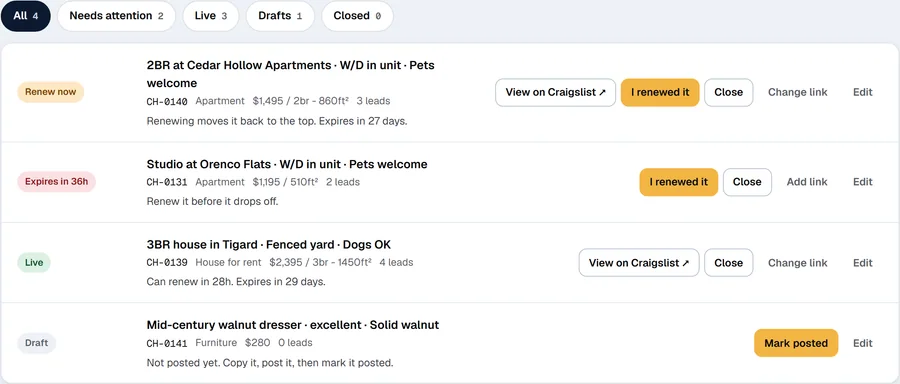
Mark an ad posted#
- Post the ad on the posting site.
- In My listings, click Mark posted on the draft.
- A9 Lister asks for the link to your live ad. Paste it and click Save, or click Skip. You can add it later with Add link.
The row becomes Live, and the tab shows a message: "AL-0003 is live. A9 Lister will tell you when it can be renewed."
Renew an ad#
- Look for rows labelled Renew now, or use the Needs attention filter. A number on the My listings tab counts them.
- Renew the ad on the posting site.
- Back in A9 Lister, click I renewed it. The row goes back to Live, and the message says "Renewed. Next renewal in 48 hours."
Renewing keeps the same post, so its link stays. Before you renew, you can switch to a different one of the ad's three titles, so the renewed ad reads a little differently. Edit the listing and pick another title under Titles.
Repost an ad#
When an ad has expired, or you took it down and want it back, post it again as a new post.
- Post the ad again on the posting site.
- In My listings, click I reposted it (on an expired row) or Post again (on a closed row).
- Paste the new link when asked. A repost is a new post with a new address, so the old link is cleared.
The 48-hour and 30-day counts start again from now.
Close a listing#
When a unit is rented or an item is sold, click Close on its row. It moves to the Closed filter and stops asking for attention. Its leads and reference code stay.
Keep the link to the live ad#
Click Add link (or Change link) on a live row and paste the web address of the ad on the posting site. The row then shows a button that opens the live ad in a new tab, so you and your team can find it without searching. Clear the box and click Save to remove the link.
Filters#
The buttons above the list narrow it down, with a count on each: All, Needs attention (renew now, expiring and expired), Live, Drafts and Closed (closed and expired listings).