Leads and reference codes
Give every ad a short code, log each call, text and walk-up against it, and see which ads and sites bring people who actually show up.
Reference codes#
Every ad you save gets a reference code, such as AL-0001. The code is the link between an ad and the people who answer it.
- The letters are your Reference code prefix on the Profile tab. It can be up to four letters or numbers. If you leave it empty, the prefix is
AL. - The number counts up by one with each ad you save.
- If Add the reference code to the end of each ad is ticked, the ad ends with a line such as "Ref: AL-0001". People can quote it when they call, and you can match the call to the ad.
Changing the prefix affects ads you save from then on. Ads you already saved keep the code they have. In a team workspace, everyone shares one counter, so two people never get the same code.
Log a lead#
A lead is one person who asked about one of your ads. Log them as soon as you can, while you remember where they came from.
- Open the Leads tab.
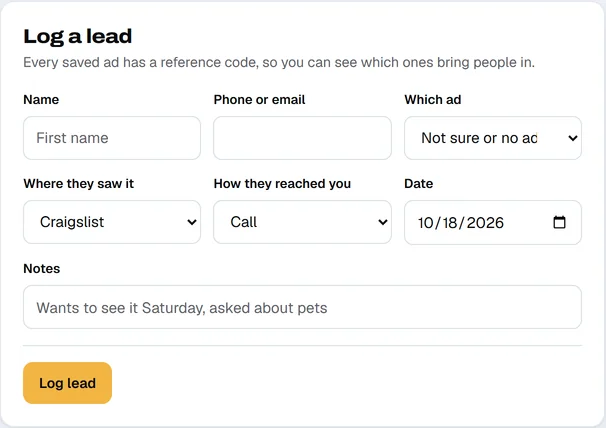
- Type their first name in Name, and a Phone or email if you have one.
- In Which ad, pick the ad they asked about. The list shows each posted ad by reference code and title. Pick Not sure or no ad if you cannot tell.
- Set Where they saw it (Craigslist, Facebook Marketplace, Zillow, Apartments.com, OfferUp, Sign or drive-by, Referral or Other) and How they reached you (Call, Text, Email, Craigslist reply or In person).
- Check the Date, add Notes such as "Wants to see it Saturday, asked about pets", and click Log lead.
Move a lead along#
Each lead on the list has a Stage menu. Change it as things happen:
| Stage | Use it when |
|---|---|
| New | They just got in touch. |
| Talking | You are going back and forth. |
| Showing set | A tour or viewing is booked. |
| Applied or offered | They applied, or you made an offer. |
| Closed | They rented or bought. |
| Lost | They went elsewhere or stopped replying. |
Use the filters above the list to see Open leads (everything not closed or lost), All, Closed or Lost. A number on the Leads tab counts leads still at New.
See which ads and sites work#
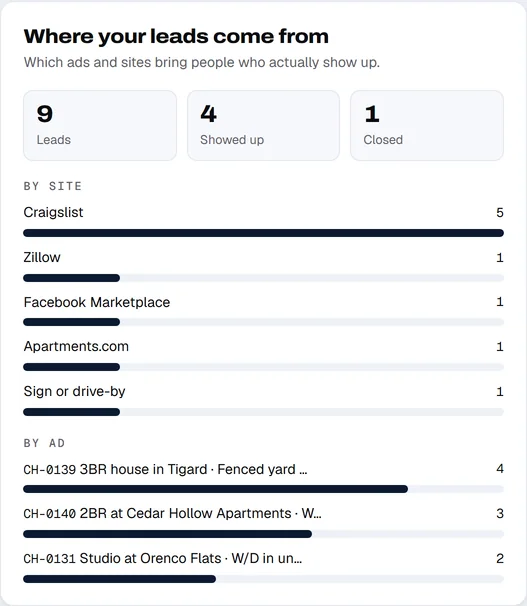
The card on the right, Where your leads come from, adds it up for you.
- Leads, Showed up and Closed are the totals. Showed up counts leads at Showing set, Applied or offered or Closed.
- By site shows how many leads each site brought.
- By ad shows your five busiest ads by reference code and title.
Each row on My listings also shows how many leads its code has, so you can see it without switching tabs.
Your lead data#
Leads are saved like everything else: in your browser in the free tool, and in the shared workspace for a team. They are not shared with anyone else. The free tool saves them in a backup file, and a workspace owner can also export them as a spreadsheet (CSV). See Exporting and deleting your data.