Getting started with A9 Lister
Pick what you are listing, fill in what you know, and copy a finished ad. This page walks the whole path, from your first ad to a renewed listing.
What A9 Lister does#
A9 Lister writes the parts of an ad that take the longest: three titles, the ad itself and the answer to every question on the posting form. It checks your wording, keeps your photos in order and shows you when each ad can be renewed. It also keeps your leads and the prices you have been comparing.
It never posts for you. You copy the ad and paste it into the site where you post. Your account on that site stays yours.
There are two ways in. The free tool at a9lister.com/write needs no account and keeps everything in your browser. A team workspace at app.a9lister.com keeps listings, leads, comps and photos in one shared place for up to 10 people. The screens work the same way in both.
Write your first ad#
You need nothing but a browser.
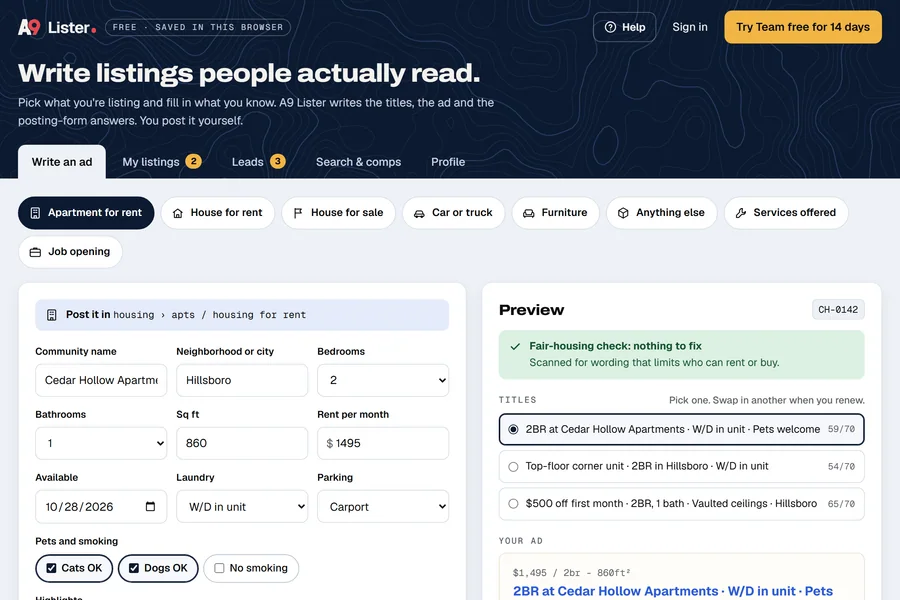
- Open a9lister.com/write. The first time, it opens on an example apartment ad so you can see the result straight away.
- Click Start blank in the bar above the form, or just type over the example.
- Under What are you listing?, pick a category, such as Apartment for rent.
- Fill in the form. The preview on the right (below the form on a phone) updates as you type.
- Under Titles, pick the title you like best.
- Click Copy both, then paste the title and the ad into the posting page. Or use the posting helper to copy one field at a time.
- Click Save to My listings. The ad gets a reference code such as
AL-0001.
Posting is the one step you do yourself. Click Open the posting page ↗ to open Craigslist's posting page in a new tab. Back in A9 Lister, open My listings and click Mark posted so it can start counting down to the next renewal. Renewals and reposting explains the rest.
Fill in your Profile once#
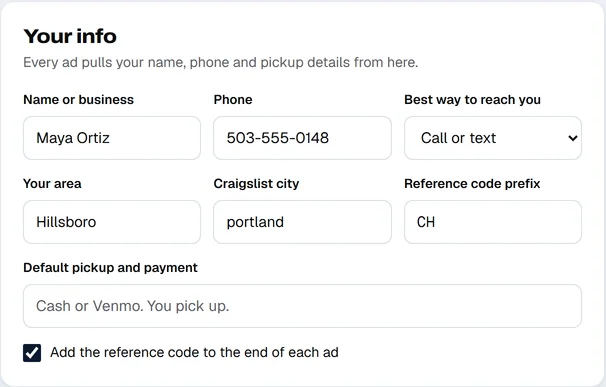
Open the Profile tab and fill in Your info. Every ad pulls your name, phone and pickup details from there, so you type them once.
- Name or business, Phone and Best way to reach you become the contact line at the end of each ad, such as "To set up a tour, call or text Maya at 503-555-0148."
- Your area is the place printed beside the title on for-sale and service ads. Default pickup and payment fills the pickup line on those ads.
- Reference code prefix is the letters in front of each ad's code, up to four. See Leads and reference codes.
- Tick Add the reference code to the end of each ad if you want the code printed in the ad text.
The tabs#
| Tab | Use it to | Read |
|---|---|---|
| Write an ad | Fill in a form and get titles, the ad and the posting-form answers. | Writing an ad |
| My listings | See what is live, what can be renewed and what is about to drop off. | Renewals and reposting |
| Leads | Log every call, text and walk-up, and see which ads bring people in. | Leads and reference codes |
| Search & comps | Open the same search in several cities, and keep the prices you find. | Comps |
| Profile | Set your details once. Back up or export your data. In a workspace: people and plan. | Exporting and deleting your data |
Where your work is saved#
In the free tool, your listings, leads, comps and profile are saved in this browser on this device, and nowhere else. Atlas9 never receives them. That keeps them private, and it means clearing your browser's site data erases them. Save a backup file now and then from Profile. Exporting and deleting your data shows how.
In a team workspace, the same things are saved in the workspace, so everyone on the team sees them and they follow you from device to device.
Get help without leaving your page#
You are reading this in the help pages, but you do not have to leave your work to use them.
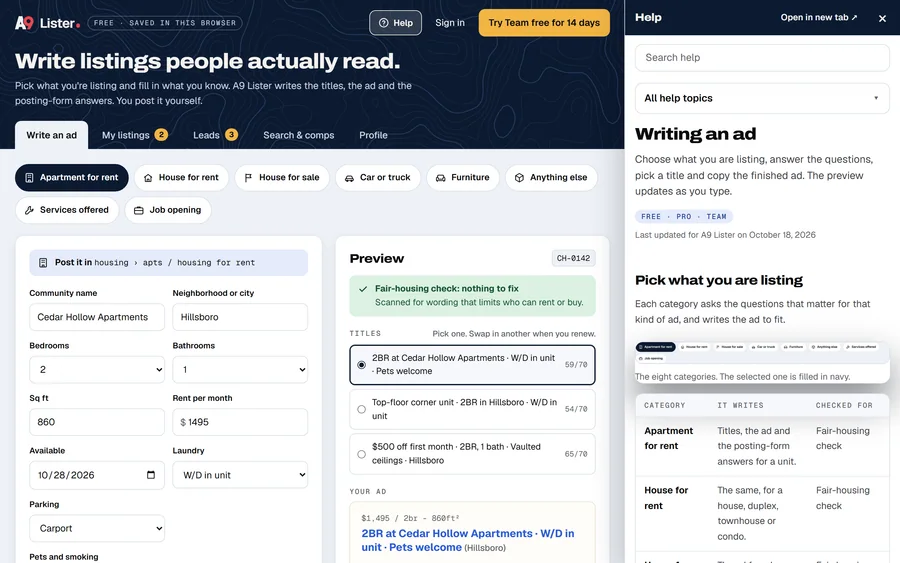
- Click Help at the top right of the tool, or press ? when you are not typing in a box.
- A panel opens beside the page (or as a sheet from the bottom on a narrow screen) with the help page for the tab you are on.
- Use Search help or All help topics in the panel to go somewhere else.
- Click Open in new tab ↗ to read the page in its own tab. Click × or press Esc to close the panel.
The page underneath stays as you left it, including anything you typed. If you change tabs while the panel is open, it follows you to that tab's page, unless you have gone somewhere else in help on your own.
Where to go next#
- Writing your first real ad: Writing an ad.
- Why a phrase was flagged: The wording check.
- Working with a team: Teams and Plans and billing.