Posting with the posting helper
Copy every answer the posting form asks for, one field at a time and in the order the form asks. A9 Lister never posts for you.
What the helper is#
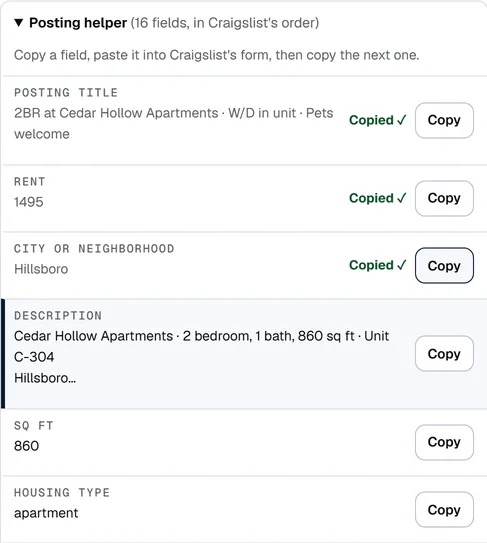
A posting form has many boxes: title, price, city, description, bedrooms, laundry, parking and more. The posting helper lists every one of them for your ad, in the order Craigslist's form asks, each with a Copy button. You copy a field, paste it into the form, then copy the next one.
It sits under the preview on the Write an ad tab, in a section called Posting helper. It opens by itself once your ad has a title, and you can open and close it with its heading.
Post an ad with it#
- Write the ad on the Write an ad tab until the preview looks right.
- Click Open the posting page ↗. Craigslist's posting page opens in a new tab. Sign in there as you normally do and choose the section named in Post it in above the form.
- Back in A9 Lister, click Copy on the first row, Posting title. Paste it into the title box on the posting page.
- Click Copy on the next row and paste again. Rows you have copied show Copied ✓, and the next row is highlighted.
- For a tick box such as Cats OK, the row says Check the box or Leave unchecked. Set the box on the form, then click Done.
- Carry on to the last row. The footer counts how many fields are done.
- Submit the form on the posting site. Then come back to A9 Lister, open My listings and click Mark posted.
If you change a field after copying it, its tick goes away, because what you copied is no longer what the ad says. Click Start over in the footer to clear all the ticks.
Which fields appear#
Only fields that have a value appear. For an apartment ad, in this order:
Posting title, Rent, City or neighborhood, Description, Sq ft, Housing type, Laundry, Parking, Bedrooms, Bathrooms, Available on, Cats OK, Dogs OK, No smoking, Application fee, Street address and City.
Other categories ask for what that kind of ad needs. A car lists Make / manufacturer, Model, Model year, Odometer, Title status and more. A job lists Compensation, Employment type and Job title. The order follows the form, so it is the same every time.
Plain text or formatted#
The Description row copies the ad in whichever format you chose under the preview. Formatted (HTML) works in Craigslist's posting box; the row says "Copies as formatted HTML". For Facebook Marketplace and OfferUp, choose Plain text before you copy. See Writing an ad.
What is not saved#
The ticks last only while the page is open. They are not saved, and not shared with your team. Reload the page and the helper starts again at the first row. The ad and its listing are saved the usual way, with Save to My listings.